
How to Use
Last update:2026-07-10 16:07:50
Atomile IAM enables you to securely manage access to Atomile products, services, and resources through your Main Account. This guide explains the IAM workflow before you create Sub Accounts and manage their permissions.
IAM Workflow
-
Main Account Permissions
- The Main Account receives system policies with default permissions for all contracted Atomile products.
- These permissions allow you to perform functional operations across your services.
-
Creating Sub Accounts
- Navigate to User Management in the Atomile Console to create new users.
- Newly created Sub Accounts do not have any permissions by default.
- The Main Account must explicitly grant permissions through system policies or custom policies.
-
Managing Permissions
- Grant system policies to delegate specific roles to end users.
- Create custom policies by combining actions based on specific requirements.
- Assign custom policies to Sub Accounts according to the required access level.
-
Control Group Assignment
- Assign Control Groups to Sub Accounts to manage specific acceleration domains.
- This step is required for managing CDN and security products.
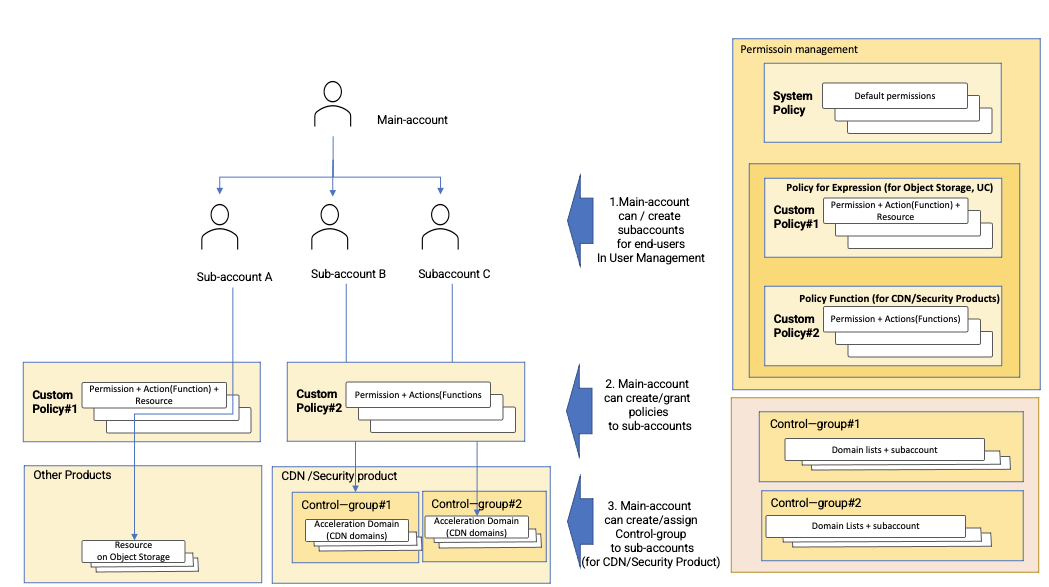
The diagram above illustrates how you can define different roles and permissions for each end user, controlling which functions are allowed or denied for each individual.
IAM Components
For efficient identity management, your Main Account automatically includes all system policies for your products. Sub Accounts require explicit policy assignments. The Atomile Console provides the following IAM functions:
Managing Users
- Navigate to IAM > Identities > Users.
- Perform user management tasks:
- Create Sub Accounts for end users
- Delete existing Sub Accounts
- Modify basic information, such as display name and email address
- Update login settings, such as resetting passwords and enabling or disabling console login
- Add or update policies to grant access to functions
Managing Permissions
- Go to IAM > Permissions > Grants.
- Assign or revoke permissions for Sub Accounts by applying the appropriate policies.
Managing Control Groups
- Go to IAM > Permissions > Control Group MGMT.
- Create and manage user-customized Control Groups.
- Assign Sub Accounts to specific CDN domains (acceleration domains).
- Note: This function is available only for CDN and Cloud Security products.
- It does not apply to Cloud Storage or UC (user management component).
Managing Policies
- Go to IAM > Permissions > Policies.
- Create or delete policies to define allowed or denied actions.
- Configure specific actions for CDN and Cloud Security products.
Important Notes
- Actions are elements that perform specific functional operations within products, such as viewing traffic charts or editing domain configurations.
- Product-Specific Requirements:
- For CDN and security products: Grant both a function policy and assign the corresponding acceleration domains through Control Group.
- For other products, such as Object Storage and UC: Grant an expression policy that includes both functions and resources.